
Step by Step Guide for SSO flow
Step 1 : Download JS SDK
a.) Download the JS SDK of PhonePe using the npm package. The details can be found here.
Step 2 : Create PhonePe instance
b.) Create an instance of PhonePe which can be accessed globally, on all the pages of the merchant website. The details can be found here.
PhonePe.PhonePe.build(PhonePe.Constants.Species.web)
  .then((sdk) => { //Get the instance of the sdk })

OR

let sdk = await PhonePe.PhonePe.build(PhonePe.Constants.Species.web)
Step 3 : Call fetchAuthToken()
c.) Call fetchAuthToken to fetch the grant token at the client-side. The details can be found here.
PhonePe.PhonePe.build(PhonePe.Constants.Species.web).then((sdk) => {
	sdk.fetchAuthToken().then((res) => {
		console.log("Grant token data received = " + res)
		alert(res)
	}).catch((err) => {
		console.log("Error occurred while fetching the grant token: " + err)
		alert(err)
	})
})
As soon as SSO fetchAuthToken is called the below pop up will be seen on UI.
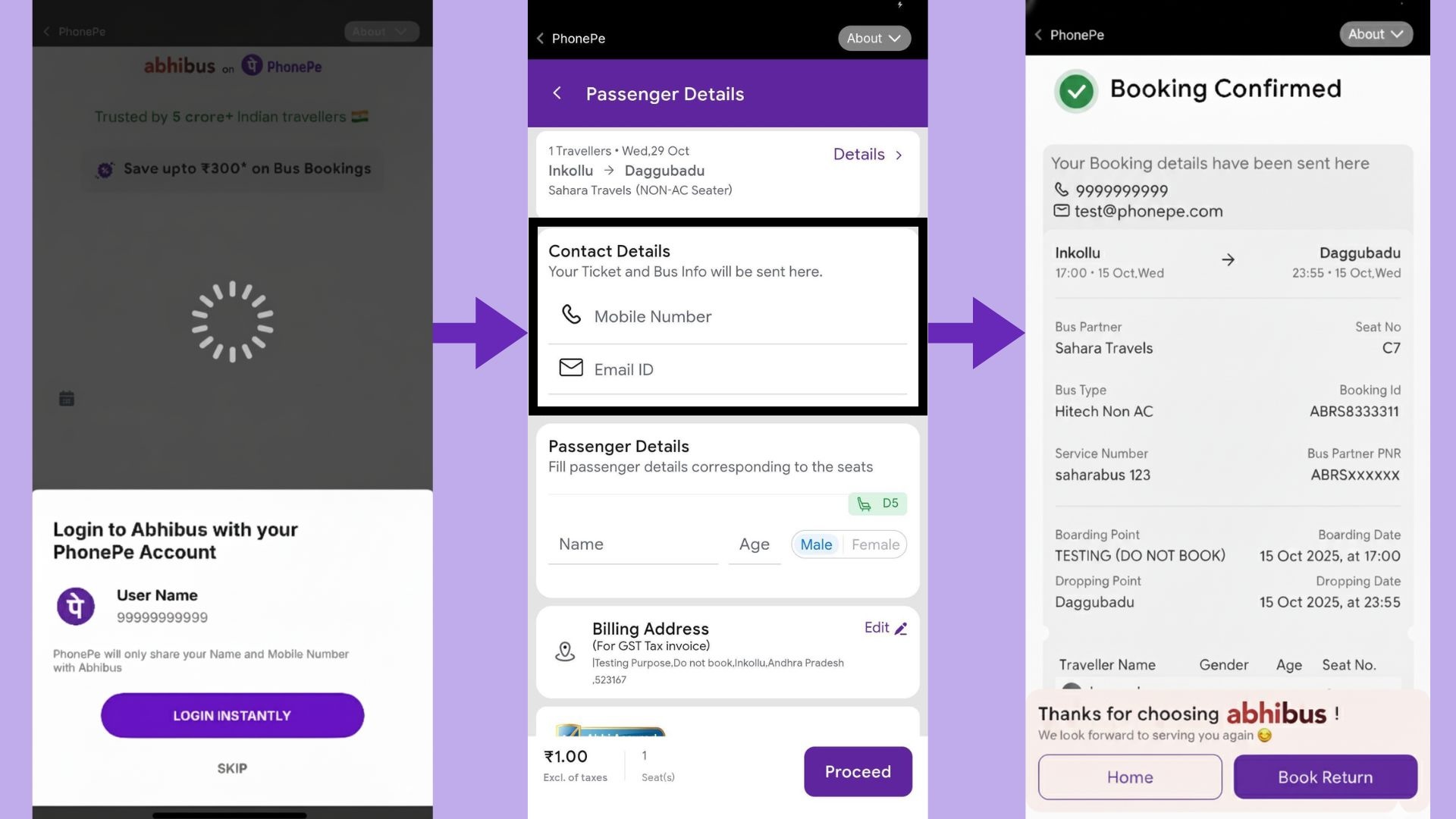
Once the above SSO pop up is shown to the user, a user can
Case 1: Click on login.
In this case grantToken is sent in response, which is used to call getAuth API to fetch the access token.
Case 2: Click on Skip.
If a user clicks on “Skip”. He is shown a login page of the site where either he can create his account or he can login inside the platform.
//If a user clicks on login, promise is resolved :

Promise resolve:
{
    "grantToken": "GRT8616a8396e9b3a0899a2a6b06a3845cf0ad3521d0c4a0d5194404fba21a00b7a",
    "expiryInSeconds": 86400
}

//If a user clicks on Skip, promise is rejected :

Promise reject:
{
  "error_code": "NETWORK_ERROR"
}
Calling fetch Access token (Backend API)
d.) In case a user clicks on login, the grant token is sent at the client-side, which is used to fetch the access token. The details can be found here.
Creating Curl request :

a.) URL : https://apps-uat.phonepe.com/v3/service/auth/access

b.) Create curl request body

The grant token which was fetched in the fetchAuthToken() method
{
"grantToken":"GRTe098bd540176757ybbnhu879125ebec723741c5189f6a4e303f2b9d28d3e4d1289bd61dd"
}

Base encode the above using the link(https://www.base64encode.org/)

The base 64 value of
{
"grantToken":"GRTe098bd540176757ybbnhu879125ebec723741c5189f6a4e303f2b9d28d3e4d1289bd61dd"
} is equal to :

ewoJImdyYW50VG9rZW4iOiJHUlRlMDk4YmQ1NDAxNzY3NTd5YmJuaHU4NzkxMjVlYmVjNzIzNzQxYzUxODlmNmE0ZTMwM2YyYjlkMjhkM2U0ZDEyODliZDYxZGQiCn0=

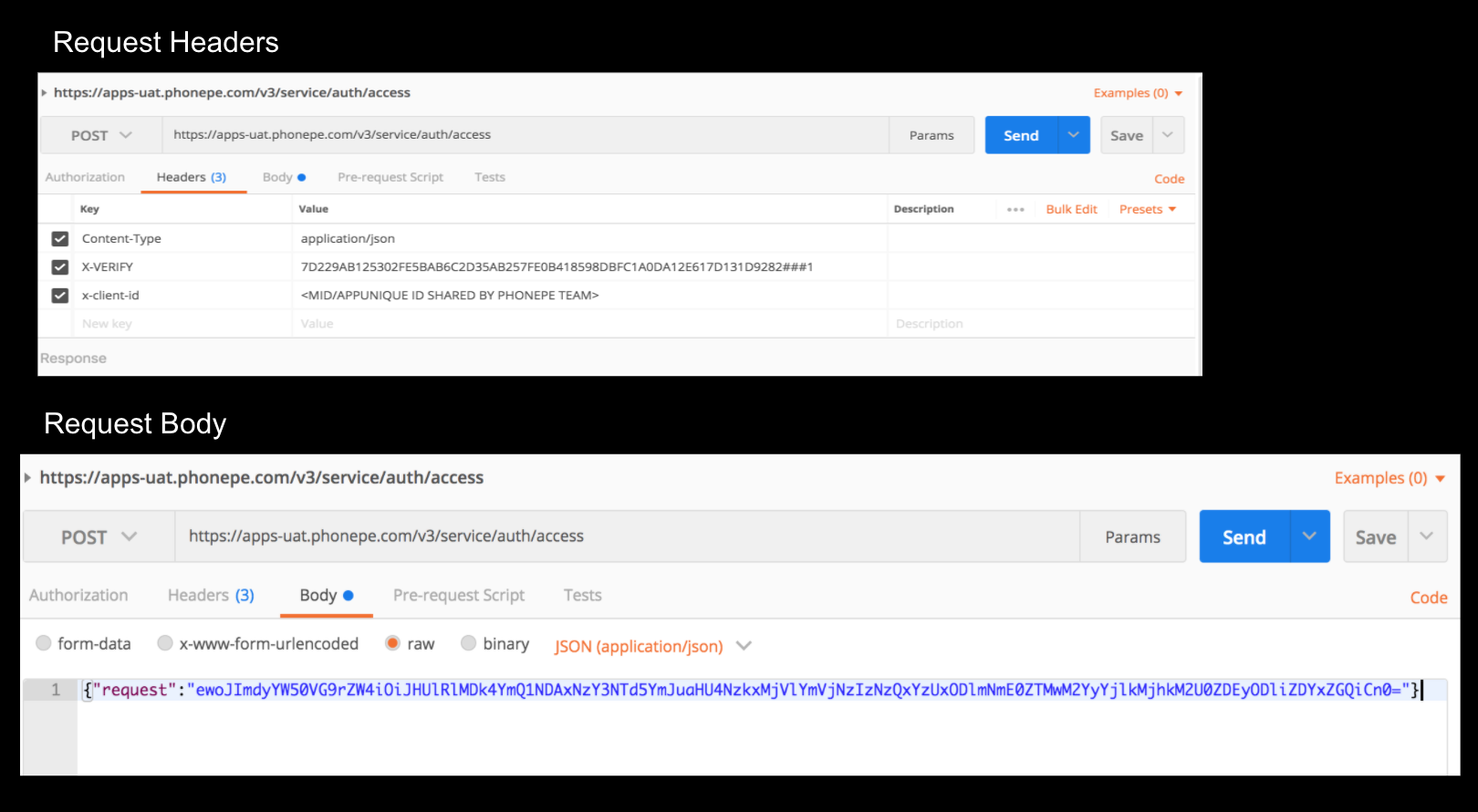
Send the base encoded value in the "request" key as below . Example :

{
  "request": "ewoJImdyYW50VG9rZW4iOiJHUlRlMDk4YmQ1NDAxNzY3NTd5YmJuaHU4NzkxMjVlYmVjNzIzNzQxYzUxODlmNmE0ZTMwM2YyYjlkMjhkM2U0ZDEyODliZDYxZGQiCn0="
}

c.) Create x-verify :

Logic of calculation : SHA256(only base64 encoded str+ "/v3/service/auth/access" + salt key) + ### + salt index

1. salt key and salt index will be always unique which will be shared by the PhonePe team for each merchant.

Suppose the key and index are : {'keyIndex': 1, 'key': '427560aa-5c48-462c-9c93-e45efefc3875'}

2. Calculate the SHA256 using the link as : https://passwordsgenerator.net/sha256-hash-generator/

SHA256 of (ewoJImdyYW50VG9rZW4iOiJHUlRlMDk4YmQ1NDAxNzY3NTd5YmJuaHU4NzkxMjVlYmVjNzIzNzQxYzUxODlmNmE0ZTMwM2YyYjlkMjhkM2U0ZDEyODliZDYxZGQiCn0=/v3/service/auth/access427560aa-5c48-462c-9c93-e45efefc3875) is equal to

7D229AB125302FE5BAB6C2D35AB257FE0B418598DBFC1A0DA12E617D131D9282

x-verify : 7D229AB125302FE5BAB6C2D35AB257FE0B418598DBFC1A0DA12E617D131D9282###1

3. Headers :

x-verify : 7D229AB125302FE5BAB6C2D35AB257FE0B418598DBFC1A0DA12E617D131D9282###1
x-client-id: <MID shared by the PhonePe integration team>
content-type: application/json
curl -X POST \
  https://apps-uat.phonepe.com/v3/service/auth/access \
  -H 'content-type: application/json' \
  -H 'x-client-id: <MID shared by the PhonePe integration team>' \
  -H 'x-verify: 53D6A504A597688B09CC23140A533F6EDDF406DC13F6E8B0D26857A792ED9268###1' \
  -d '{"request":"ewogICJncmFudFRva2VuIjoiR1JUOTcxNTY0M2NiZWQ2YmJiMzlkY2Q1ZjUzOTExNmRiMzUzZTcwOWI0YjA4NzI4NGE4OThmZGRjNTFhN2VjMGM5ZiIKfQ=="}'

Response :

{
    "success": true,
    "code": "SUCCESS",
    "data": {
        "accessToken": "AUTHca12ab41b97bea5268e65593ab2a1cc697338a656e8",
        "expiresInSeconds": 1800
    }
}
Calling Get User details API (Backend API)
e.) Using access token from above API, user details are fetched by calling getUserDetails API
Creating Curl GET request :

a.) URL : https://apps-uat.phonepe.com/v3/service/userdetails

b.) Create x-verify :

Logic of calculation : SHA256(/v3/service/userdetails + salt key) + ### + salt index

1. salt key and salt index will be always unique which will be shared by the PhonePe team for each merchant.

Suppose the key and index are : {'keyIndex': 1, 'key': '427560aa-5c48-462c-9c93-e45efefc3875'}

2. Calculate the SHA256 using the link as : https://passwordsgenerator.net/sha256-hash-generator/

SHA256 of (/v3/service/userdetails427560aa-5c48-462c-9c93-e45efefc3875) is equal to

0F8B5CFEA573998562D960FDD504819DC9544091D699412E3EBC4F2653B056E9

x-verify : 0F8B5CFEA573998562D960FDD504819DC9544091D699412E3EBC4F2653B056E9###1

3. Headers :

x-verify : 7D229AB125302FE5BAB6C2D35AB257FE0B418598DBFC1A0DA12E617D131D9282###1
x-client-id: <MID shared by the PhonePe integration team>
content-type: application/json
x-access-token : <Token which was fetched using the access token API>
curl -X GET \
  https://apps-uat.phonepe.com/v3/service/userdetails \
  -H 'content-type: application/json' \
  -H 'x-access-token: AUTHa859ede5a5e2c4ed78f2534a72e8ebe4bb1e47322ca61ae6644316976f7d230d' \
  -H 'x-client-id: <MID/APPUNIQUE ID SHARED BY PHONEPE TEAM>' \
  -H 'x-verify: 0F8B5CFEA573998562D960FDD504819DC9544091D699412E3EBC4F2653B056E9###1'

  Response :

  {
    "success": true,
    "code": "SUCCESS",
    "data": {
        "name": "Anurag",
        "phoneNumber": "9888888888"
    }
}

Incase of email is shared

{
   "success": true,
   "code": "SUCCESS",
   "data": {
       "name": "Rohit Kumar",
       "phoneNumber": "9888888888",
       "primaryEmail": "[email protected]",
       "isEmailVerified": true
   }
}

You can find the POSTMAN code here.
Step 4 : Check the flow inside PhonePe testing builds
f.) Download the PhonePe build(APK/IPA) and test the method inside the PhonePe APP. How to do the same can be found here.
All the PhonePe Switch client-side methods can be tested inside the PhonePe App. The method will not work on the web browser.


