
Autopay Integration
Here’s how the integration process with PhonePe Payment Gateway works.
Follow the steps outlined below to set up and verify your payment flow with ease.
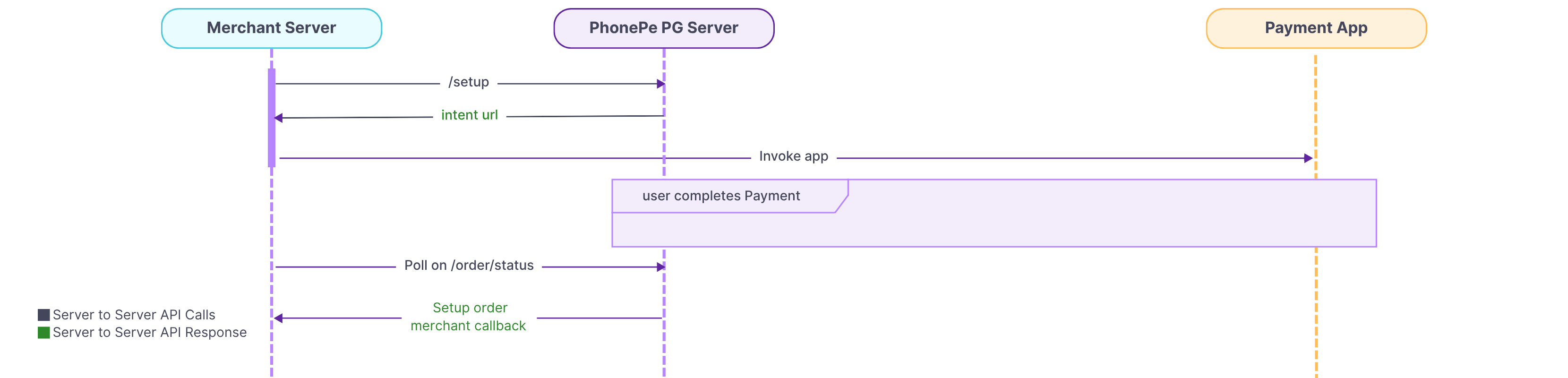
1. Generate an authorization token to authenticate your system
Authentication is the first step in PhonePe Payment Gateway’s standard checkout API integration. It involves generating an authorization token to make further API calls.
Creating an authorization token to make API calls means generating a unique key or password that proves your system has permission to interact with PhonePe Payment Gateway. This token identifies and authenticates your website when it requests services like processing payments, checking status, etc.
For complete details, refer to the Generate Authorization Token.
2. Subscription Setup
In this step, you will need to call the subscription setup API to setup a mandate for your user.
For complete details, refer to the Subscription Setup.
Once the user completes the mandate through mandate supported apps( PhonePe, BHIM, GPay, Paytm, CRED, Amazon Pay), use Subscription Order Status API to check the status of a Subscription Setup after initiating it.
To check the status of the Subscription, use the Subscription Status API to retrieve the current Subscription Status.
3. Redemption Notify
In this step, you should call Redemption Notify API from your backend. This API will initiate a notification to your user informing them that their debit is scheduled after 24 hours.
For complete details, refer to the Redemption Notify.
4. Redemption Execute
The Redemption Execute API is to directly debit the required payment from a user’s bank account, thereby initiating and completing the actual financial transaction. This API should be called from the backend only if it is Merchant controlled debit.
For complete details, refer to the Redemption Execute.
After initiating a redemption request for an active subscription, use the Redemption Order Status API to check the execution status and check whether the redemption has been notified, is in pending, or completed.
5. Verifying Payment Response
In a subscription system, it’s important to know whether a payment was successful, failed, or still pending.
PhonePe supports this with automated callbacks for two key events:
- Subscription Callbacks
Sent when a new subscription is created. These confirm if the user’s first payment was successful or not, helping you handle activation or failure from the start. - Redemption Callbacks
Sent for ongoing auto debits. These share the status of each recurring payment and provide individual transaction details, which are useful for retries and reconciliation.
Other features:
- Cancel Subscription: Use the Cancel Subscription API to deactivate an active autopay subscription that is no longer required.
- Pause or Unpause Subscription: PhonePe will send an Webhook callback to notify you that the subscription has been Paused/Unpaused from the user’s end.
- Revoke Subscription: PhonePe will send an Webhook callback to notify you that the subscription has been cancelled from the user’s end.
- Initiate Refund and Check Refund Status: The Refund API allows you to initiate refunds for specific transactions, returning funds to customers for reasons like order cancellations, returns, or payment adjustments. You can also check the status of the initiated refund.
What’s Next?
Now that you are aware of what Autopay is, let’s explore how to integrate the Autopay feature.


