
Python SDK Integration
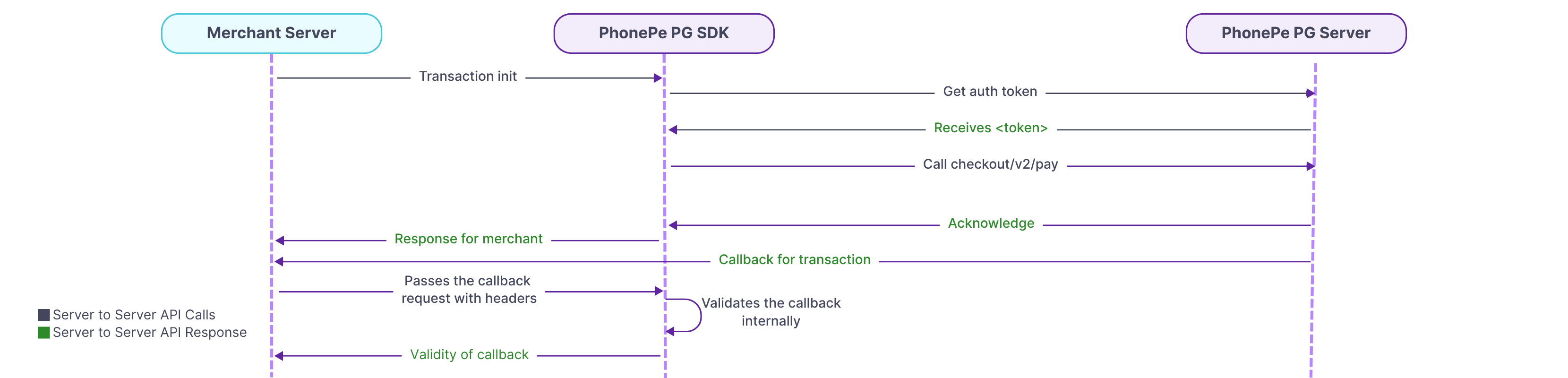
PhonePe SDK for Python enables merchants to seamlessly integrate payment functionalities into their backend. It supports features like payment initiation, order status checks, refunds, and callback validation using simple method calls.
The SDK provides structured request builders and response models to streamline integration.
With proper setup using client credentials and environment configs, merchants can securely handle the full payment lifecycle.
1. Install PhonePe SDK
To get started, install the PhonePe Python SDK using pip. Make sure you have Python 3.9 or later installed. Use the command below to add the SDK to your project from the official PhonePe repository.
To install the PhonePe SDK, refer to the SDK Installation.
2. Class Initialization
The StandardCheckoutClient class is used to establish secure communication with PhonePe APIs in the Python SDK. You must initialize this client only once during the application’s runtime using your client_id, client_secret, client_version, and the desired environment (SANDBOX or PRODUCTION). Reinitializing the client will raise a PhonePeException, so ensure the credentials are accurate before creating the instance.
To set up your Client ID and Client Secret, refer to the Class Initialization.
3. Initiate Payment
Use the pay() method to initiate a payment through Standard Checkout.
Build the request using StandardCheckoutPayRequest with order ID, amount, and redirect URL.
The response includes a redirect_url to redirect the user for completing the payment.
To initiate payments, refer to Initiate Payment.
4. Create SDK Order
Use the create_sdk_order() method to generate an order token for mobile app payments.
Build the request using CreateSdkOrderRequest with merchant order ID, amount, redirect URL, and meta info.
The response includes a token that the frontend app uses to initiate the payment flow.
To create SDK order, refer to Create SDK Order.
5. Order Status
Use the get_order_status() method to check the current status of an order using its merchant_order_id.
The response includes the order’s state, amount, expiry time, and a list of payment attempts.
Each attempt provides information such as transaction ID, payment mode, and status.
To check order status, refer to Order Status.
6. Initiate Refund
Use the refund() method to initiate a refund by providing the original order ID, a unique refund ID, and the refund amount (in paise).
To track the refund, use the get_refund_status() method with the merchant refund ID.
The response includes refund state, amount, order ID, and details of each transaction attempt.
To initiate a refund and check its status, refer to Refund and Refund Status.
7. Webhook handling
Use the validate_callback() method to verify the authenticity of a callback received from PhonePe.
Pass the configured username, password, callback body, and Authorization header to confirm that the callback is valid.
The response includes the callback type and detailed data such as order or refund ID, state, amount.
To verify the callback refer to Webhook Handling.
8. Exception Handling
All API errors are captured as PhonePeException. This exception provides useful information such as HTTP status code, error message, internal error code, and a detailed data map. You can use this to debug and handle failures gracefully in their integration flow. Additional response models like PaymentRail and PaymentInstrumentV2 are returned under getOrderStatus() to help identify transaction sources and methods.
For complete details, refer to the Exception handling.
By following the above steps, you can integrate the PhonePe Python SDK to initiate payments, check order and refund statuses, verify callbacks, and handle exceptions, ensuring a smooth and secure payment experience for your customers.
What’s Next?
You’ve now understood the key steps involved in integrating PhonePe Payment Gateway into your website. Let’s begin the actual integration with Installing the SDK.


