
Introduction to Android SDK
What is an SDK?
An SDK (Software Development Kit) is a collection of tools and libraries that makes it easier for developers to add specific features or functionalities to their apps, without starting from scratch.
The PhonePe Payment Gateway Android SDK helps you quickly integrate secure and reliable payment processing into your Android app. It handles all the complex parts of the payment flow, so you can focus on delivering a smooth experience to your users. With just a few lines of code, you can start accepting payments through various modes supported by PhonePe.
The PhonePe Android SDK supports multiple payment methods, including:
- UPI
- Cards
- Net Banking
- Wallets
With the Android SDK, you can deliver a seamless, app-native payment experience to your users.
This guide will walk you through everything, from setting up the SDK to initiating transactions and handling refunds.
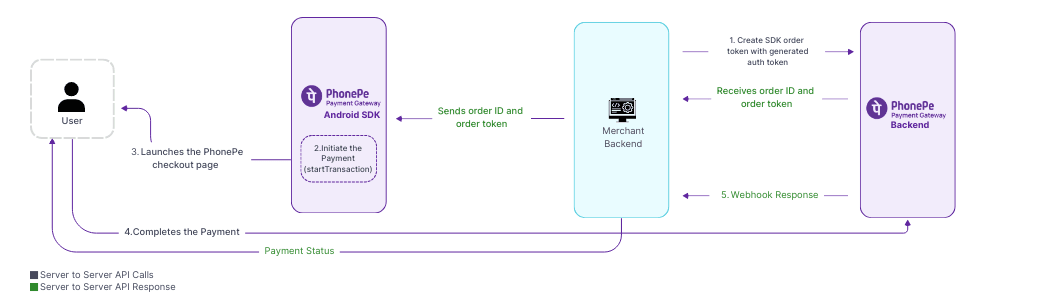
User Journey
The following user journey illustrates the complete payment lifecycle to help you understand the integration flow clearly.
Prerequisites
Before you begin integrating the PhonePe Android SDK, ensure you have the following:
- Android Studio installed (latest version recommended)
- Android SDK version 5.4.0
- Basic knowledge of Java or Kotlin for Android development.
- Project Requirements:
- compileSdkVersion: 28 or higher
- minSdkVersion: 21 or higher
- targetSdkVersion: 28 or higher
Integration Overview
Below is a step-by-step overview of how the integration process works:
- Customer initiates a payment from Android app.
- Your backend fetches an Auth Token using the Authorization API.
- Your backend creates a payment order using the Create Order API.
- The SDK is initialized from Android app.
- The app launches PhonePe checkout screen using the SDK.
- User completes the payment and is redirected back to your app.
- Your backend verifies the final payment status using Webhook or the Order Status API.
Environments
Use the environment URLs below to integrate and test your API calls. The Sandbox environment is intended for testing and validation, while the Production environment should be used once your integration is live. Make sure to switch the base URL based on the environment you’re working in.
| Environment | API |
Sandbox | https://api-preprod.phonepe.com/apis/pg-sandbox/<Endpoint> |
Production | Authorization API: https://api.phonepe.com/apis/identity-manager/<Endpoint> Other APIs: https://api.phonepe.com/apis/pg/<Endpoint> |
Note: To ensure a smooth integration, please integrate with the Test environment first and then move to production.
API Endpoints
Here’s a quick reference to the key APIs involved in the Android SDK integration flow. Each API plays a specific role, from initiating a transaction to handling refunds and fetching statuses. Use this table to understand which endpoint to call for each step in the payment lifecycle.
| API | Method | Endpoint |
Authorization | POST | /v1/oauth/token |
Create Payment | POST | /checkout/v2/sdk/order |
Order Status API | GET | /checkout/v2/order/{merchantOrderId}/status |
Refund | POST | /payments/v2/refund |
Refund Status API | GET | /payments/v2/refund/{merchantRefundId}/status |
What’s Next?
Now that you’re familiar with the Android SDK and how it streamlines payment integration, you can begin the actual integration process.
In the next section, we’ll guide you through the integration steps to help you set up and start accepting payments in your Android app.


