
Introduction to PhonePe .NET SDK
The PhonePe .NET SDK(v2.1.2) offers a simple and secure way to connect your .NET backend with the PhonePe Payment Gateway. It provides all the essential tools to initiate and manage payments, track transaction and refund statuses, and handle callback events directly from your server.
By integrating with the .NET SDK, you can streamline your payment flow and ensure a smooth experience for both your system and your customers. The following sections will guide you through the end-to-end integration journey using this SDK.
User Journey
The following user journey illustrates the complete payment lifecycle to help you understand the integration flow clearly.
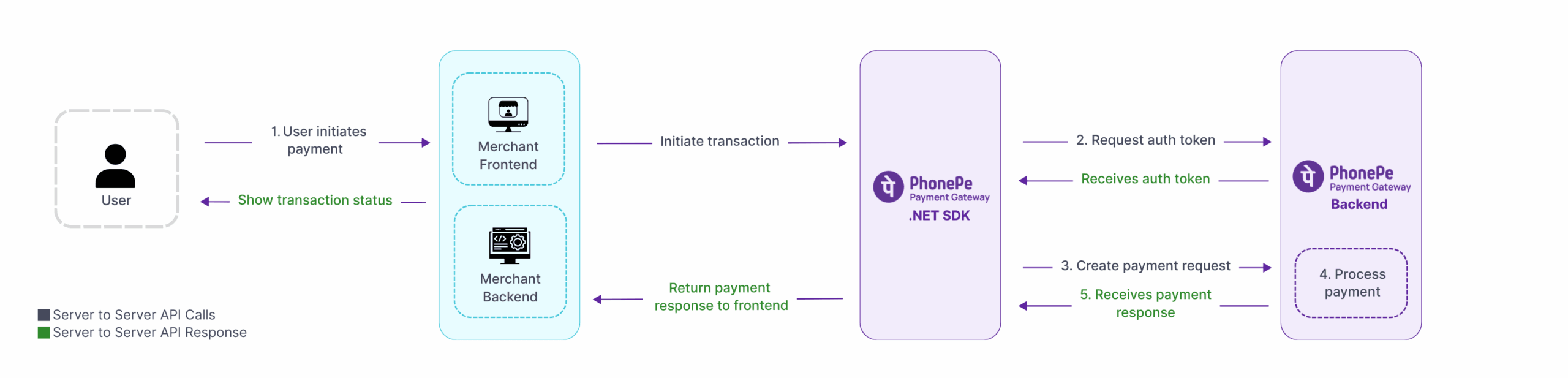
Prerequisites
Before you start the integration process, ensure you have:
- Access to PhonePe PG’s UAT (User Acceptance Testing) and Production Credentials(Merchant ID, Client ID, Client Secret and Client Version).
- A basic understanding of HTTP methods (GET, POST) and JSON.
- .NET 8.0 or above installed on your system.
You can find your Client ID and Secret in the PhonePe Business Dashboard. Set the ‘Test Mode’ toggle to ON to get Sandbox (UAT) credentials, or set it to OFF to get Production credentials.
String clientId = "<clientId>";
String clientSecret = "<clientSecret>";
Integer clientVersion = <clientVersion>;
What’s Next?
Now that you know about the .NET Backend SDK, you can start to integrate the PhonePe Payment Gateway into your website. The next section will guide you step by step on how to set it up.
Head over to the next section to learn the key steps involved in integrating PhonePe Payment Gateway into your website.


