
SDK Setup
This section explains how you can setup the PhonePe iOS SDK(v5.4.3).
You can also you use the Demo App: https://github.com/PhonePe/phonepe-pg-ios-demo
Prerequisites
- XCode 12.5 or newer
- Cocoapod
- Onboarded on PhonePe as a Merchant (Given a MerchantID, Client Secret and version to generate the o-auth token )
iOS PG SDK setup
The PhonePePayment framework is needed for the SDK to work for both Sandbox (Testing) and Production (Deployment) environments.
- The PhonePePayment SDK is available through CocoaPods [Refer to this link ], Latest PhonePe iOS SDK Version: 5.4.3
pod 'PhonePePayment'pod installImport the framework in your project using “import PhonePePayment”
Remove the “DirectPaymentSDK” from your project if you have already integrated and want to migrate to CocoaPods.
import PhonePePaymentiOS PG App Side Implementation
Step 1: In your Info.plist, create or append a new Array type node LSApplicationQueriesSchemes to append the following values:
<key>LSApplicationQueriesSchemes</key>
<array>
        <string>ppemerchantsdkv1</string>
        <string>ppemerchantsdkv2</string>
        <string>ppemerchantsdkv3</string>
        <string>ppemerchantsdkv4</string>
        <string>ppemerchantsdkv5</string>
        <string>supermoney</string>
        <string>credpay</string>
        <string>amazonpay</string>
        <string>bhim</string>
        <string>gpay</string>
        <string>paytmmp</string>
        <string>navi</string>
        <string>mobikwik</string>
        <string>slice-upi</string>
        <string>postpe</string>
        <string>popclubapp</string>
        <string>jiofinance</string>
        <string>jupiter</string>
        <string>indmoney</string>
        <string>kiwi</string>
        <string>flipkart</string>
        <string>myjio</string>
        <string>sbiyono</string>
        <string>whatsapp-consumer</string>
        <string>payzapp</string>
</array>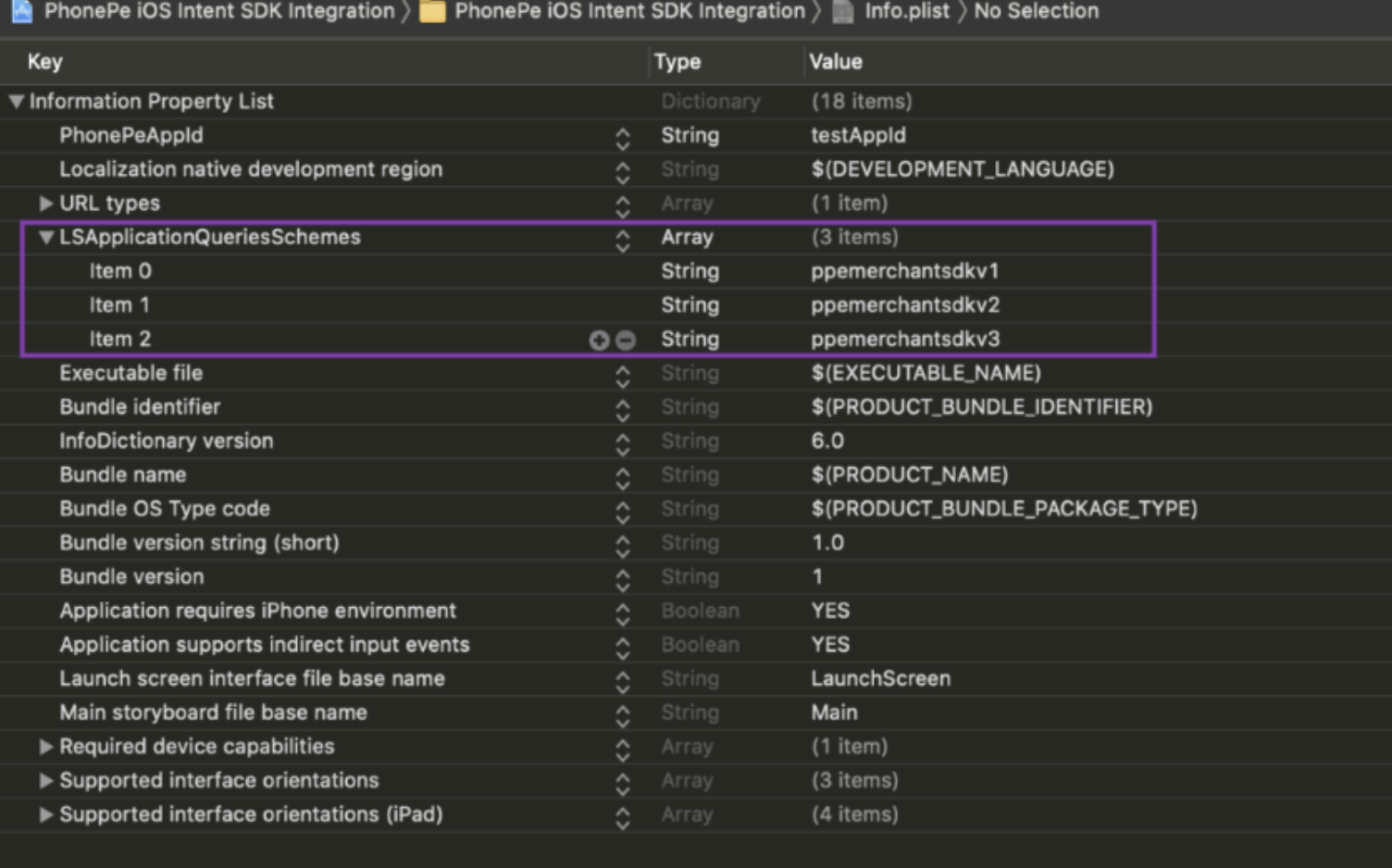
Step 2: Create DeepLink Schema
- Create a URLType for your app (Deeplink), if not already present. For example, we have used: iOSIntentIntegration. (You can create your own identifier for your app)
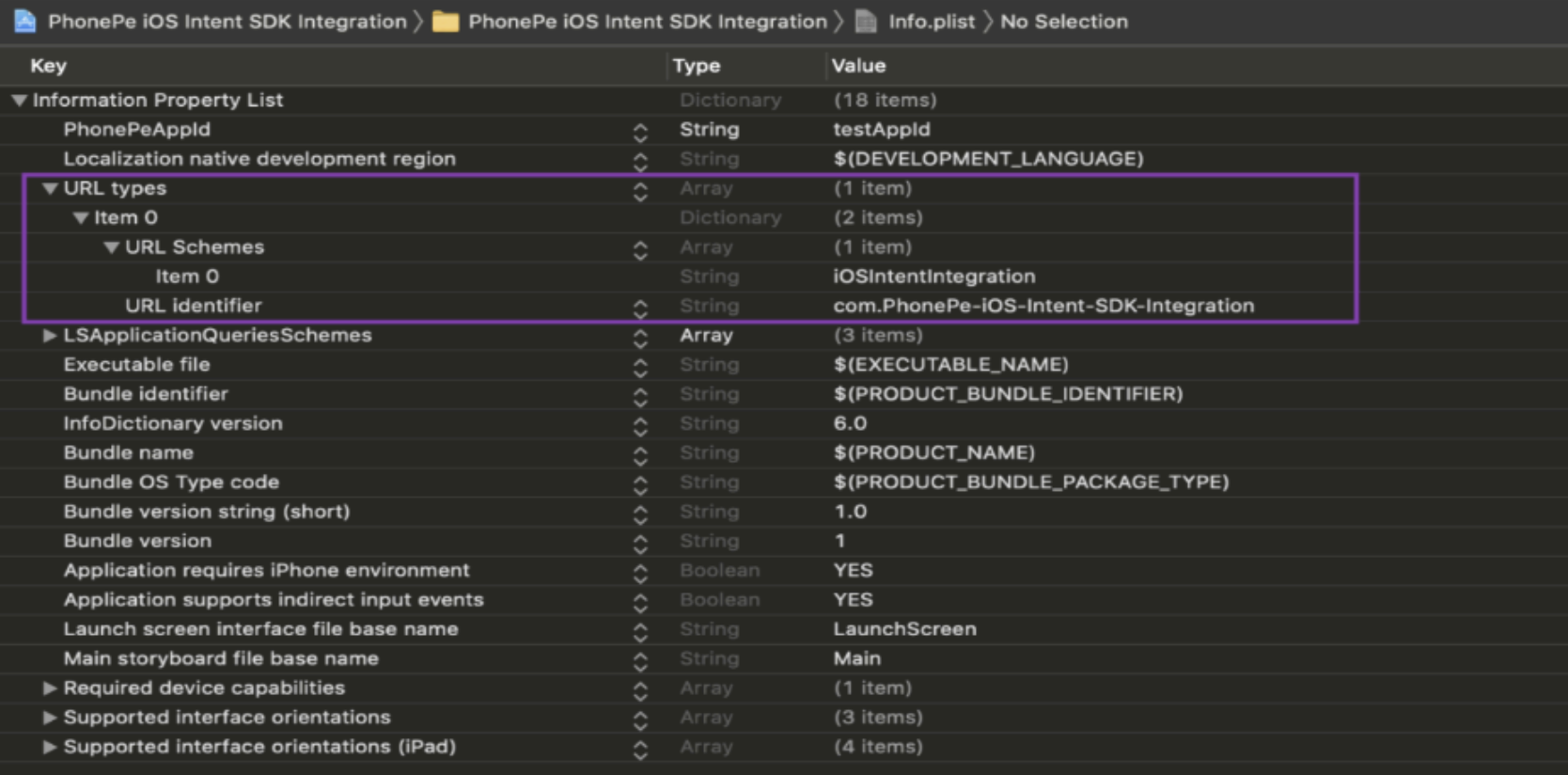
- URLScheme should match the below conditions :
- Only alphabets (uppercase and lowercase) and numbers are allowed.
- Special characters permitted: dot (.) and hyphen (-).
- The name must always start with an alphabet.
- The schema must be correct; otherwise, the app will not redirect back to your app.
- To Enable Debug Logs
- Update the PPPayment.enableDebugLogs = true or enableLogging flag to true in PPPayment class initialisation.
Step 3: Initialize the PG SDK
let ppPayment = PPPayment(environment: .production,
                          flowId: "FLOW_ID",
merchantId: "MERCHANT_ID")| Parameter Name | Type | Description |
|---|---|---|
environment | Enum | • .production for Production• .sandbox for PreProd |
flowId | String | Pass the merchant user Id or the unique string (UUID().uuidString) for every init for analytics purposes. |
merchantId | String | The merchant Id provided by PhonePe |
enableLogging | Boolean | [Optional Parameter] • True (To enable the SDK logs) • False (To disable the SDK logs) Note: In Prod, make sure to set as False. |
Step 4: In your AppDelegate, check for a callback from the PhonePe app and if found, pass it to the SDK.
func application(_ app: UIApplication, open url: URL, options: [UIApplication.OpenURLOptionsKey : Any] = [:]) -> Bool {
    let handled = PPPayment.checkDeeplink(url, options: options)
    if handled {
       // Phonepe is handling this, no need for any processing
       return true
   }
   //Process your own deeplinks here
   return true
}
What’s Next?
In the next section, you will learn how to generate an auth token.
Head over to the next section to learn how to securely authenticate your API requests using our Authorization API.


